
Adding Short-Link Sharing to a Hugo
After using the blog for so long, sharing articles still had a small annoyance in everyday use.
Sometimes I want to share a post on public platforms. The link is long, and when you open it you still get the full site chrome—navigation, sidebars, footer, and so on. That’s fine when I’m browsing for myself, but when someone only wants to read one article, they don’t necessarily need all of that.
I’d thought about a separate share page or another set of templates. In the end I didn’t bother. The article content is the same file; there’s no need to generate a second HTML copy for sharing. I added a read-only mode on the existing Hugo pages, used a Cloudflare Worker for short-link redirects, and wired the whole flow to a share button on the article page.
What It Looks Like in the End
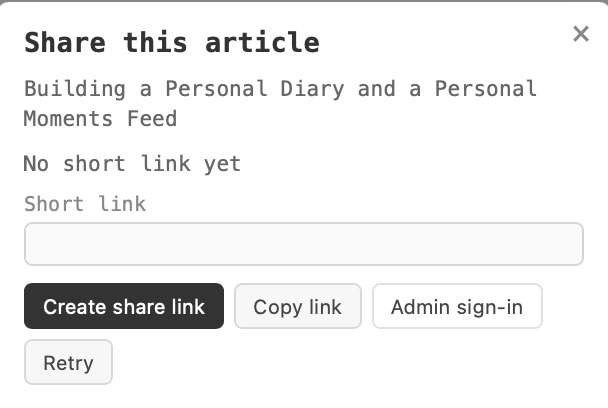
When you visit an article normally, the page looks the same as before, but at the bottom—next to the RSS button—there’s a share button. Click it and the system checks whether that article already has a short link.
- If one exists, reuse it.
- On first share, request the Worker to create a short link.
- After creation, copy the short link.
- When someone opens the short link, the Worker looks up Cloudflare KV and redirects to the article in read-only mode.
- Share mode only hides outer site navigation and tools; it does not regenerate the article page.
The access flow looks roughly like this:
 1Normal article
 2https://www.igerm.ee/essay/example/
 3
 4Share short link
 5https://www.igerm.ee/s/短码
 6
 7Worker queries KV
 8        |
 9        v
10Original article URL + ?share=1
One important point: the short link does not point at another copy of the article, and article body is not stored in Cloudflare. It only keeps the mapping between a short code and the original article path. The article is still served by Hugo’s static output. That keeps Cloudflare build time much lower.
1. Turn the Article into Read-Only Mode First
Hugo still uses the same article URL; you only add a query parameter:
1https://www.igerm.ee/essay/example/?share=1
On load, check whether the URL has share=1. If it does, add a share-mode class on the document root; CSS uses that to hide UI you don’t need. The core logic is simple:
1(() => {
2  const params = new URLSearchParams(window.location.search);
3
4  if (params.get("share") === "1") {
5    document.documentElement.classList.add("share-mode");
6  }
7})();
Then in CSS, under share-mode, hide the top nav, sidebar, mobile nav, footer tools, and so on. You need to match the theme’s actual DOM; otherwise you can easily hide the article body, images, or table of contents by mistake. I recently added a moments-style home that puts body content on the index without a detail page—that’s another place to be careful.
I care that normal browsing is unchanged. Every hide rule must be scoped under .share-mode; without that marker, the original layout stays as it was.
There’s another upside: you don’t generate a second HTML file per article. The article URL, canonical, RSS, and sitemap don’t need to change—share mode is just another display state of the same page.
2. Short Links with a Cloudflare Worker
My blog is a Hugo static site—no classic backend—and I didn’t want Docker, a database, or a always-on box just for short links. The domain already sits on Cloudflare, so Worker plus KV is enough.
The pieces are straightforward:
| Component | Role |
|---|---|
| Cloudflare Worker | Handle short-link requests, look up mappings, redirect |
| Cloudflare KV | Store short code ↔ article path |
| Hugo | Still build and serve the real articles |
| Cloudflare Access | Protect the create API so only I can create links |
What you can think of as stored in KV:
1key:   dit28n
2value: /essay/example/
Visit:
1https://www.igerm.ee/s/dit28n
The Worker takes dit28n from the URL, reads the article path from KV, builds the on-site article URL, appends ?share=1, and returns a redirect.
The Worker never reads article body and never writes article content into KV—only small mapping records.
Why Put Mappings in KV
If short codes lived in Worker source, every new article would mean editing code and redeploying. That’s a non-starter.
With KV, Worker logic stays stable; new articles only add a mapping. Existing short links don’t disappear when you rebuild the site or redeploy the Worker.
The Worker reaches it through the SHORT_LINKS binding. KV is cloud storage separate from Hugo output; redeploying static files doesn’t wipe it.
Security Checks on the Worker
A short link is a redirect entry. Without restricting targets, it could become an open redirect—e.g. someone stores a record that sends visitors to an unrelated external site. I don’t want that.
So the Worker must not blindly trust externally supplied target URLs. On create and on redirect it validates paths—only internal article paths on this site—and handles weird encoding, path traversal, and the like. If a code doesn’t exist, return 404 instead of redirecting somewhere random.
Redirects use a temporary redirect, not permanent 301, so if mappings need to change later, browsers and caches are less likely to pin an old target forever.
3. Who May Create Short Links
Short-link follow can be public; create cannot.
Putting an admin token in front-end JavaScript means anyone can see it in devtools. Minification and renaming don’t make that safe. The browser must not carry a long-lived admin secret baked into public code. (Yeah, exposing the token might not do much in practice—but free Access only allows 50 users; if the token leaked, my card would hate me…)
I went with Cloudflare Access for identity.
In Cloudflare Zero Trust I added a Self-hosted app protecting:
1www.igerm.ee/api/share-links/*
The Access policy is Allow for specific email identities only. Visitors can still read articles and follow short links; the create API requires Access login first.
On the Worker side I also verify the JWT Cloudflare Access sends—issuer, application AUD, expiry. Creating a link isn’t “any request that looks logged in”; the server still validates.
I kept the original Bearer token path for the shell and curl. It lives in a Cloudflare Worker Secret—not in Hugo config, not in a public repo, not in the browser.
Related settings:
1ACCESS_TEAM_DOMAIN
2ACCESS_AUD
3SHARE_LINK_ADMIN_TOKEN
The first two are for Access JWT verification; the last is the secret for the CLI admin API.
In production, secrets belong in the Cloudflare Dashboard—never real values in code or in a blog post.
Safari Login Redirect Took a Detour
This part ate more time than I expected.
At first I tried to stitch together the Cloudflare Access login URL in the front end. Safari showed a blank page; Chrome acted up too. Access’s real login URL carries dynamic parameters—you can’t treat Team Domain plus /cdn-cgi/access/login as a fixed entry.
I stopped guessing the login URL. The browser hits a protected API path on this site; Cloudflare runs the login flow. After login, a Worker bounce route sends you back to the article.
You can’t trust the bounce parameter blindly either. The Worker checks return—only article paths on this site; it rejects external hosts, protocol-relative URLs, and paths like /api/ or /s/ that shouldn’t be article landing pages. You get back to the right article without turning login into an open redirect.
In the end ChatGPT helped me nail the config…
4. Put Short Links on the Article Page
After the backend and auth were in place, I changed the Hugo front end.
The share button sits after the article body and before the footer copyright, beside the RSS button—out of the way unless you scroll down to share.
The front-end script mostly:
- Reads the current article
pathnameas the article path. - Calls the public query API to see if a short link already exists.
- If yes, reuse it—don’t create again.
- If not, call the create API protected by Access.
- On success, copy the short link and show the result.
- On failure, show an error, allow retry, and avoid duplicate submits from rapid clicks.
Easy to miss: store window.location.pathname, not the full current URL. Share mode adds ?share=1 for display only—that must not go into KV as the article path.
For example:
1const path = window.location.pathname;
Chinese paths must be encoded correctly on the request URL so queries don’t break. The Worker normalizes and validates. Share mode also hides the share button—read-only visitors don’t need another share button or site toolbar.
5. Deploy and Test in Practice
This touched Hugo templates, front-end JavaScript, CSS, and the Worker. The Worker added a jose dependency to verify Cloudflare Access JWTs, so the build needs npm install first.
I wasn’t thrilled, but every other option looked like even more code… so yeah, suddenly there’s Node in a Hugo project. Ha!
Cloudflare Workers Builds build command became:
1npm ci && bash scripts/build-cloudflare.sh
Deploy:
1npx wrangler deploy
I still use the repo’s git-push deploy flow. Commit locally, push the branch, Cloudflare Workers Builds builds and deploys—no logging into a server by hand.
Closing
On the surface it’s just a share button under the article. Under the hood there’s plenty: Hugo page state, Worker routes, KV storage, short-link create and reuse, Access auth, JWT verification, browser login bounce, plus copy and error handling on the front end.
I didn’t add a server or a database. Hugo keeps writing articles; the Worker owns short-link logic; KV holds mappings; Access guards create. Each piece does what it’s good at.
Created short links stay in Cloudflare KV. Rebuild Hugo or update the Worker and the mappings remain. Click share again on the same article and it reuses the existing link—you don’t mint a new one every time.
At the end of the day the blog is for writing. What Cloudflare can host, let it host—don’t spin up another system you have to babysit for one small feature.